
Your email signature appears at the bottom of every message you send. For agents who rely on email to nurture leads, confirm showings, and close transactions, that small block of text and imagery carries more weight than most agents realize. A well-designed signature reinforces your brand as a real estate agent. It builds trust and turns routine correspondence into a marketing touchpoint. A poorly executed one can undermine your credibility or worse, go completely unnoticed. The difference lies in intentional design, strategic content choices, and a clear understanding of what actually converts.
Why Your Real Estate Email Signature Matters More Than Ever
Every inbox is crowded. Clients juggle messages from multiple agents, lenders, inspectors, and attorneys throughout a transaction. Your signature is often the last thing someone sees before they decide whether to reply, save your contact, or archive the thread.
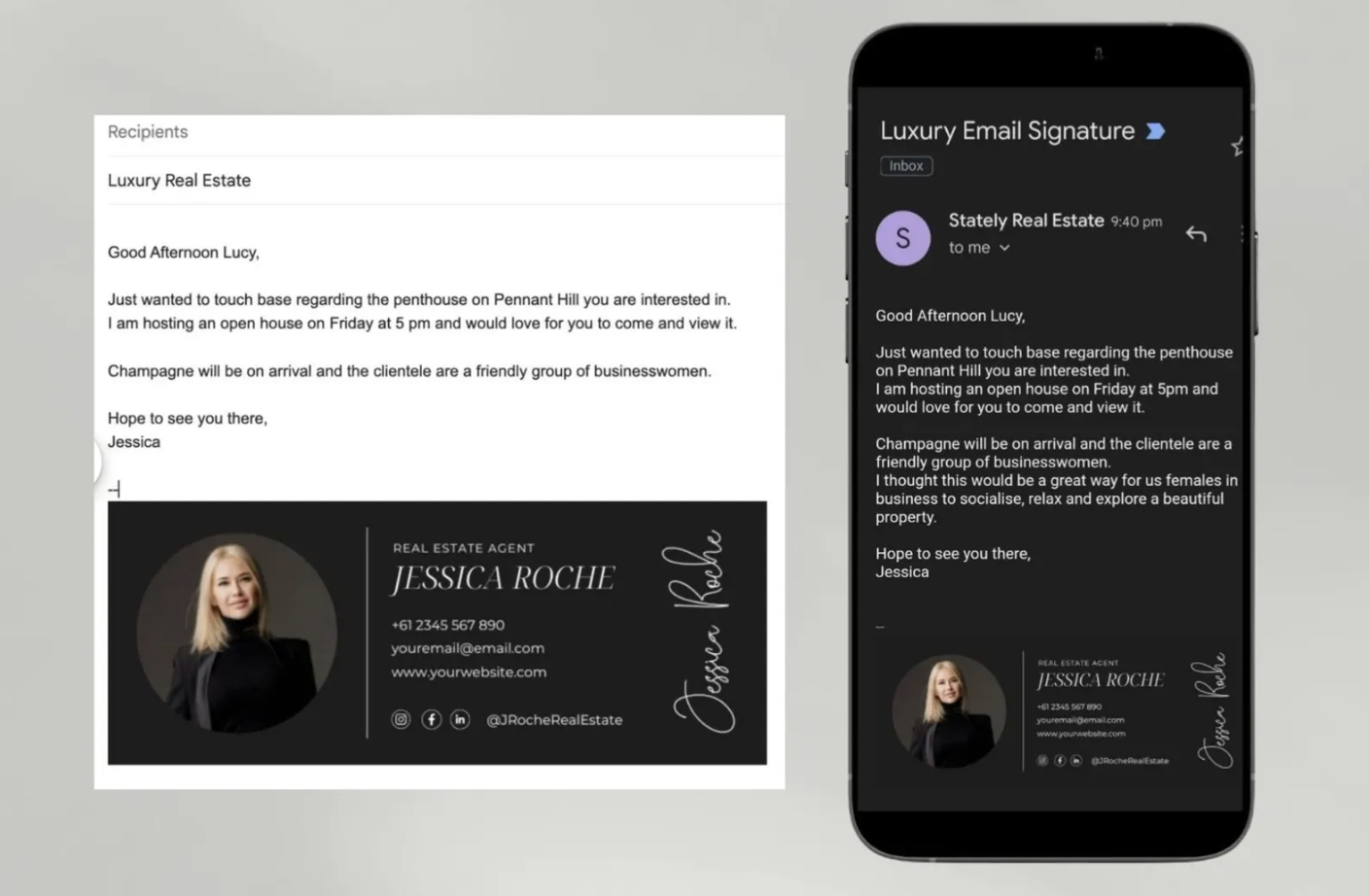
In luxury real estate particularly, presentation signals competence. A signature that looks like an afterthought suggests you approach everything else the same way. On the other hand, a polished signature that aligns with your personal branding communicates attention to detail before you ever meet face-to-face.
First Impressions Through Repetition
Most agents think about first impressions at open houses or listing presentations. But email signatures create first impressions dozens of times a week. A prospect who receives your market update, your showing confirmation, and your follow-up email all sees your signature. Repetition builds familiarity, and familiarity builds trust, but only if the signature is consistent and professional.
What to Include in a Real Estate Agent Email Signature
The best real estate email signatures balance information with simplicity. Too sparse and you miss opportunities; too cluttered and the message gets lost.
Essential elements:
- Full name and professional designation (REALTOR®, if applicable)
- Job title (Luxury Real Estate Agent, Broker Associate, etc.)
- Brokerage name (required in most states)
- Direct phone number
- Professional email address
- Physical office address or service area
- Website URL
Strategic additions:
- Professional headshot (high-quality, brand-consistent)
- One or two social media icons linked to active profiles
- Awards, certifications, or affiliations (e.g., Certified Luxury Home Marketing Specialist)
- A single, clear call-to-action (schedule a consultation, download a buyer guide)
- Legal disclaimers or equal housing opportunity logo if required
The National Association of REALTORS® provides guidance on logo usage and disclosure requirements that apply to all forms of advertising, including email signatures.
What to Leave Out
Inspirational quotes rarely convert. Neither do animated GIFs, multiple fonts, or background images. Email signatures work best when they’re scannable in under three seconds. Every line should serve a purpose: contact, credibility, or conversion.
Avoid listing every phone number you’ve ever had. One mobile number is enough. Skip the fax line unless your market genuinely uses it (rare in 2026). Don’t embed your entire social media feed or multiple calls-to-action that compete for attention.
Real Estate Email Signature Examples


Classic Agent Signature:
Ellenor Knox
Real Estate Agent | Your Realty Group
(555) 123-4567 ·
yourewebsite.com
Licensed in [State] · Lic. #000000
Luxury Agent Signature:
[Headshot] Ellenor Knox, REALTOR®
Luxury Property Specialist, Your Realty Group
Lic. #000000
(555) 123-4567 · yourwebsite.com
[Instagram] [LinkedIn]
Book a private consultation
Want these designed to match your brand? Stately members get ready-to-use email signature templates alongside their monthly social and print designs.
Design Best Practices for Professional Signatures
Email clients render HTML inconsistently. What looks perfect in Gmail may break in Outlook, Apple Mail, or mobile apps. That’s why agent email signatures need to follow strict design principles.
| Design Element | Best Practice | Why It Matters |
|---|---|---|
| Width | 600 pixels maximum | Prevents horizontal scrolling on mobile |
| Font | System fonts (Arial, Georgia, Verdana) | Ensures consistent rendering across clients |
| Images | Hosted externally, under 50KB total | Reduces load time and spam filter triggers |
| Color | 2-3 brand colors maximum | Maintains visual clarity and brand consistency |
| Links | Absolute URLs, properly formatted | Ensures tracking works and links don’t break |
HubSpot’s professional email signature guide covers formatting details and provides templates that work across major email platforms.
Mobile-First Layout
Most emails are now opened on a phone, according to Litmus’s email client data, so your signature needs to be thumb-friendly. That means:
- Clickable phone numbers (with tel: links)
- Large enough tap targets for icons (minimum 44×44 pixels)
- Single-column layout that stacks cleanly
- Readable font size (12-14px minimum for body text)
Testing your signature on actual devices, not just responsive preview tools, reveals issues you won’t catch otherwise. Send yourself test emails and open them on an iPhone, Android, iPad, and desktop client.
Brand Consistency Across Your Marketing
Your signature shouldn’t exist in isolation. The colors, fonts, typography, and tone should mirror your business cards, listing presentations, social media graphics, and website. This consistency is what builds a recognizable brand over time.
If your real estate marketing materials use a specific shade of navy and a serif font for headings, your signature should reflect that. If your Instagram feed emphasizes clean minimalism, a busy signature with five different fonts contradicts that message.
The agents who close luxury listings most consistently aren’t necessarily the ones with the biggest budgets. They’re the ones whose every touchpoint, from their yard sign to their email signature, tells the same visual story.
For agents building a cohesive brand presence, a real estate content subscription provides monthly templates for everything from social posts to email signatures, all designed to work together seamlessly. The time you save on design frees you up for the work that actually generates commissions.

Typography Hierarchy
Your name should be the most prominent element, followed by your title and contact information. Use font size and weight to create visual hierarchy:
- Name: 16-18pt, bold
- Title: 14pt, regular or medium weight
- Contact details: 12-14pt, regular weight
- Legal text: 10pt, regular weight
This hierarchy guides the reader’s eye and ensures the most important information registers first.
Accessibility Considerations
Accessible signatures are good practice and are required in some government and institutional work, particularly for agents working with government contracts or certain institutional clients.
Core accessibility requirements:
- Sufficient color contrast (4.5:1 minimum for text)
- Descriptive alt text for all images
- Semantic HTML structure
- Keyboard-navigable links
- Screen reader-friendly layout
The federal Section 508 guidance outlines email accessibility requirements for government communications. Even if you’re not required to comply, following these standards makes your signatures usable for everyone.
Compliance and Legal Requirements
Real estate is heavily regulated. Your signature needs to comply with state licensing laws, fair housing requirements, and brokerage policies.
Required Disclosures
Most states require agents to include their brokerage name in all advertising, which extends to email signatures. Some states require your license number. Check your state real estate commission’s advertising rules.
The equal housing opportunity logo or statement may be required depending on your market and the type of properties you represent. Fair housing compliance isn’t optional, and violations can result in serious penalties.
| State Requirement | Common Elements | Where to Verify |
|---|---|---|
| Brokerage name | Mandatory in most states | State real estate commission |
| License number | Required in some states | State licensing board |
| Equal housing logo | Recommended, sometimes required | HUD guidelines |
| Legal disclaimers | Varies by brokerage | Broker compliance officer |
Trademark and Branding Rules
If you use REALTOR® in your signature, it must be in all caps with the registered trademark symbol. The National Association of REALTORS® enforces this strictly.
Similarly, if your brokerage has brand guidelines for how agents represent the company, your signature must comply. Some brokerages provide approved templates; others have specific rules about logo placement, color usage, or disclaimers.
Updating and Maintaining Your Signature
Your email signature isn’t set-and-forget. They need regular updates to stay current and effective.
Update your signature when:
- You earn a new designation or award
- Your phone number or office location changes
- Your brokerage rebrands
- You launch a new service or niche
- Seasonal campaigns require different CTAs
- Your headshot is more than two years old
Some agents create multiple signature versions: one for buyer leads, one for seller prospects, one for vendor relationships. This level of customization requires organization but can improve relevance significantly.
Testing and Iteration
The best way to improve your signature is to test variations and measure results. Try different CTAs, adjust the layout, or experiment with including (or excluding) social icons. Campaign Monitor’s email best practices guide includes A/B testing frameworks that apply to signatures as much as marketing campaigns. Small changes compound over thousands of emails. Small changes add up over thousands of emails over a year.
Installation Across Email Platforms
Each email client has its own signature setup process, and most agents use multiple platforms (desktop Outlook, Gmail web, mobile apps).
Gmail Setup
- Open Gmail settings (gear icon, then “See all settings”)
- Scroll to the “Signature” section
- Click “Create new” and name your signature
- Paste or design your HTML signature in the editor
- Set it as default for new emails and replies
- Save changes
Gmail’s editor strips some formatting, so test thoroughly before relying on it for client communication.
Outlook 365 Setup
- Open Outlook and click Settings (gear icon)
- Select “View all Outlook settings”
- Navigate to “Mail” > “Compose and reply”
- Click “New signature” and paste your HTML
- Choose which accounts and message types use the signature
- Save changes
Microsoft 365 signature guidance covers both individual signatures and organization-wide deployment for brokerages managing multiple agents.
Mobile Configuration
Most mobile email apps pull signatures from your desktop settings automatically, but formatting can break. Always send test emails from your phone to see how signatures actually appear to recipients.
Some agents create simplified mobile-only signatures with just their name, phone, and brokerage. This ensures nothing breaks and keeps the focus on the message itself.
Email Signature FAQs for Real Estate Agents
What should a real estate agent put in their email signature?
Your name, title, brokerage, phone number, email and website, plus any license number or disclosures your state requires. A headshot and one call to action are optional extras.
Do I need my license number in my email signature?
Some states require it in all advertising, and email counts. Check your state real estate commission’s advertising rules and your brokerage’s policy.
What size should an email signature be?
Keep it under 600px wide and images under about 50KB total so it loads quickly and doesn’t break on mobile.

Email signatures for agents are quiet brand builders that work every time you hit send. When designed with intention and aligned with your broader marketing presence, they turn everyday correspondence into opportunities for connection and conversion. Whether you’re building your brand from scratch or refining an established presence, Stately Members Club provides the templates, tutorials, and resources you need to maintain a polished, professional image across every touchpoint.


